Set up study
You first apply (if you do not already have) for an account, log in with your credentials and create an experiment using our webpage. It is highly recommended to read the complete "General procedure" and "Possible CAM study designs" parts before starting collecting data. It is also possible to set up your study "on scratch" and use your own server (see final section).
General procedure
If you want to set up a CAM study using the administrative panel you need to do the following steps on our webpage https://drawyourminds.de/
- If you do not have an account please go to the register page and create yourself an account
- After we have provided you with an account, please go to the login page
- After logging in, you will see the dashboard on which it is possible to:
- ADD EXPERIMENT: create a CAM experiment by defining the desired parameters of your CAM study
- Link Participants: send the link of your experiment directly to participants or use the link within an online-experiment (it is important to add a unique participant ID to your CAMs, see last step)
- Enter Experiment: enter your CAM experiment to get real-time statistics of your collected data
- Click on the button "ADD EXPERIMENT" at the lower center of the page, in the pop-up you can change the following:
- Provide a name for the CAM study: name of your CAM study
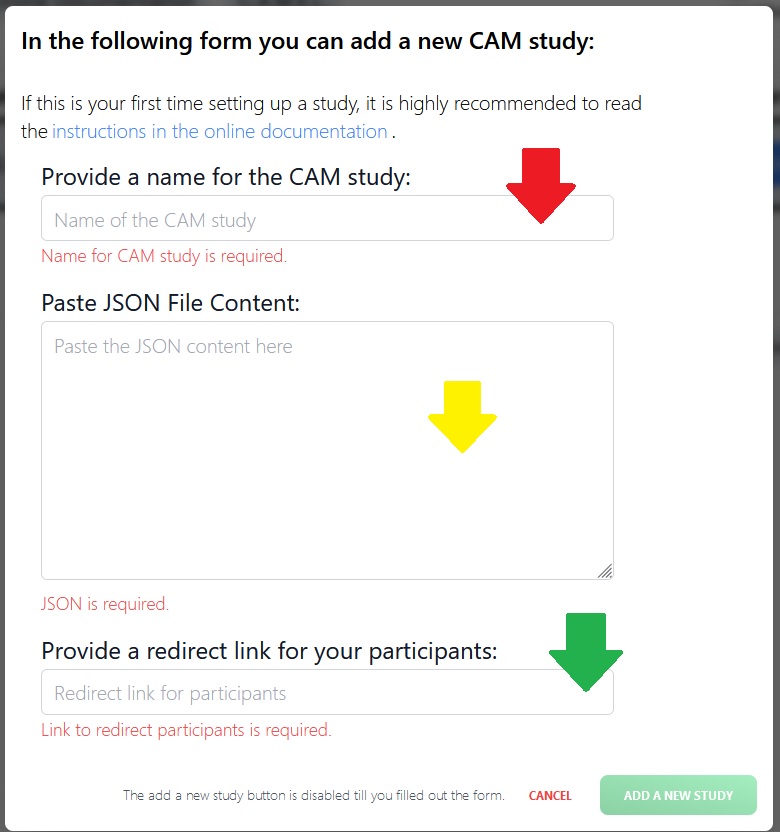
- Paste JSON File Content: paste the JSON file of your CAM study, including the pre-defined concepts / connectors and the configuration (see step 5.)
- Provide a redirect link for your participants (mandatory): link to redirect participants after they have drawn their CAM
-
To configure your CAM, please close the pop-up and click on the button "Data Collection" at the top (check out the Data Collection Tool page for details); two steps are needed:
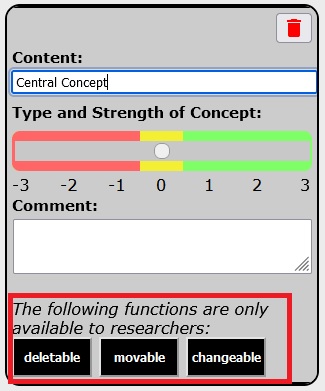
- first step: draw your default CAM: start with changing the central pre-defined concept. It is highly recommended to set the pre-defined concepts to not be deletable, changeable and movable, using the black researcher buttons at the bottom of the concept dialog (pops up if you double click on a drawn concept)1. Further you can draw connections and set them to non-deletable.
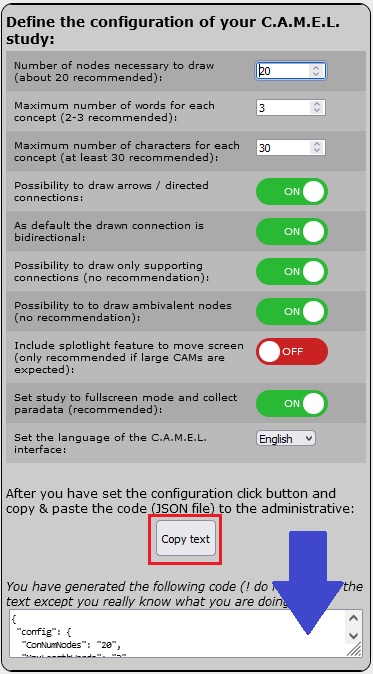
- second step: after you have drawn your default CAM, click on the "gear symbol" (top left) to define the configuration of your CAM study (see details in Define your config file)
=> when you are happy with your default CAM and the configuration please copy the generated configuration file2 to the pop-up of the administrative panel in the middle text box where is written "Paste the JSON content here"3
-
Finally, give your CAM study a name and provide a link to which participants should be redirected3
- To check if everything went well, you should try out once your defined CAM study: (a) if your participants are redirected from a previous study part (e.g., where you describe your participants how to draw a CAM) you need to pass the unique ID of the participant to the URL parameter "participantID", (b) if you present the participants a study part after they have drawn a CAM (e.g., socio-demographic questions) make sure to save the URL parameter participantID in your study
- you could check the (b) step by just clicking "Copy link" and add a random participant ID after the URL parameter like "&participantID=11111", make sure to save the ID "11111" in your data set
1researcher functionalities:
Use the black researcher buttons at the bottom of the concept or connector dialog page to set defined concepts or connectors to not deletable, movable (concept cannot be moved) or changeable (content of concept cannot be changed):
2generated configuration file:
After you have drawn your default CAM and configured the Data Collection Tool, you can copy the text by using the button "Copy text" (red rectangle), or if this is not working copy the text manually from the textbox (blue arrow):
3Add CAM study (within administrative panel/ webpage):
Copy the generated configuration file to the administrative panel/ webpage within the central textbox (yellow arrow). It is important to not change this file. The title of your study can be added under Name (red arrow) and if you want to redirect your participants to a further study you can provide the redirect link (green arrow):
Instructions
If you want to explain your participants how to draw a CAM you could use our text instructions, which can be downloaded from GitHub (currently in German and English): https://github.com/CAM-E-L/materials/tree/master/Instructions%20Data%20Collection%20Tool
Please read the readme file on the GitHub page for detailed explanations of the instructions.
Possible CAM study designs
CAMs can be used in a multitude of study designs, ranging from a one time elicitation to multiple times of measurement, from letting participants freely associate with no pre-defined concepts to having participants build a network with-, and ascribe affective value to predefined concepts only1. How the initial concepts are placed also has an influence on the resulting arrangement of concepts and graphs in CAMs, which can be used to evoke different network topologies.
By independently adjusting, for example, whether participants can add, adjust or delete concepts, you are able to give participants a predefined set of concepts that cannot be altered and ask them to connect the concepts to best represent their own cognitive representation of these concepts. This would provide you with a standardized set of concepts which allows for easy interpretation and comparison of how different participants / groups decide to structure and connect them. On the other end of the spectrum, a completely open or explorative design is possible, too. If you are more interested in eliciting an unbiased cognitive-affective representation about a certain concept, you can provide participants with a limited amount of / one initial concept(s) (or even none at all!) and ask them to freely add concepts to the CAM as they see fit.
From the vast amount of possible CAM study designs, the following are just an example to showcase the many different possibilities CAMs offer in research:
Different (experimental) designs:
CAMs can be used in multiple ways and during multiple stages of the research process. The following options can give an idea of the diverse opportunities CAMs can offer in research:
CAM as graphical representation:
- CAMs as a one time elicitation of the cognitive-affective representation a person/a group has about a certain concept / topice.g 2
quantitative/network parameters and qualitative analyses of CAMs as measurements ("dependent variables") in empirical/experimental studies:
- CAMs as a dependent variable in a pre-post intervention design, where participants either draw two separate CAMs before and after an intervention or have the chance to adjust the first CAM at a later point in timee.g 3
- CAMs in a mixed method design to augment questionnaire data with rich information about cognitive-affective representations and the possibility of freely associating, away from prespecified answer optionse.g 4
CAM as independent variable to influence/inform participants:
- Using CAMs themselves as an intervention, where participants are shown a CAM that is not their own and the influence of this exposure to somebody else's representation is assessede.g 5
- CAMs in an adaptive design, where participants receive an adaptive intervention based on an automated real time analysis of the CAM they have just drawn (e.g. specific intervention depending on mean valence of the CAM).
Different network topologies:
Analyzing network parameters of CAMs is a promising way of gaining quantitative insight into participants' cognitive-affective representations of a specific issue. When setting up a CAM study, it is possible to predefine (or choose to not predefine) central concepts as a "starting CAM" which every participant will receive as a basis to build their own CAM around. Preliminary results show that the layout and connections (referred to as the topology of a network in telecommunication science) of this starting CAM has an influence on the type of layout participants are most inclined to draw when constructing their CAM. In telecommunication technology, different network designs have specific properties and different X-ities like evolvability, scalability and adaptability of a network in a future stage (~ the finished CAM of a participant) depend on the initial network design (~ the predefined CAM given to every participant as a starting point). Knowing this, the design of the "starting CAM" should be consciously chosen as it might have an influence on the network parameters of participants CAMs. Multiple initial network topologies are possible to specify as the default CAM:
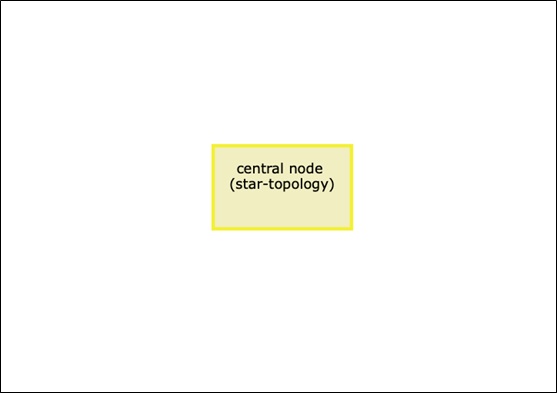
- Single concept in the middle: this design likely evokes a network which is equivalent to a physical star topology, where all concepts are connected to a central concept. This often results in high local and global density.
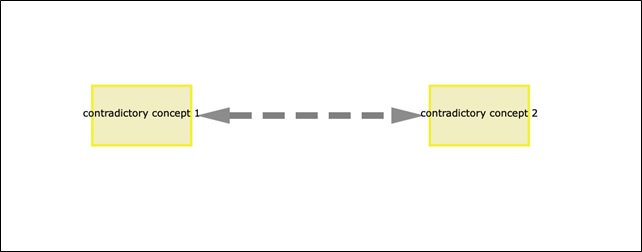
- Two contradictory concepts: specifying two contradictory concepts as a starting point is an interesting way of analyzing the perception of opposite poles or concepts. The two sub-networks of the resulting CAMs can be analyzed and compared separately in a future analyzing step (see module "slice CAMs" within Data Analysis Tool).
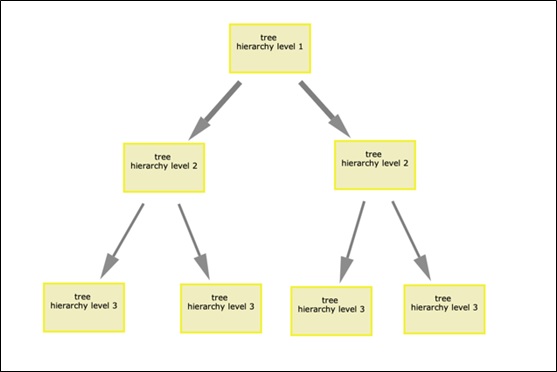
- Tree Topology: an initial hierarchical arrangement of concepts supposedly nudges participants towards "adding leaves to a predefined tree" in a hierarchical manner, differentiating and diversifying the initial network hierarchically. In contrast to star networks, tree networks typically have low overall and local density.
- No predefined concepts: letting participants start off with a clean slate typically results in a partially connected mesh topologies.
Single concept in the middle:
Two contradictory concepts:
Tree Topology:
Example studies
- complete study regarding relatively unknown topic "Stratospheric Aerosol Injection"; here included instructions CAM, scenario text, preview CAM, Data Collection Tool, technical feedbackquestions after drawing: complete study "Stratospheric Aerosol Injection"
- complete study regarding well known topic "Covid-19 pandemic"; here included instructions CAM, preview CAM, Data Collection Tool (reminder, initial pop-up included), technical feedbackquestions and one adaptive question after drawing: complete study "Covid-19 pandemic"
- adaptive study design: adaptive study design
- simply draw 2 concepts with pos. / neg. valence and connect them and click on disk symbol to save. By adaptive designs any query you can imagine (like query for the most central concept, certain neighbourhoods of given concepts, the re-presentation of the drawn CAM etc.) are possible. We also have no data limitation here as it can use functions of JATOS internally (so-called "multi-component study"), which is a server hosted in the Psychology departement within the University of Freiburg.
Program "on scratch"
Before reading this section, please read the documentation of the Data Collection Tool data collection tool.
Pre-defined elements:
The visible content of the CAM resides within an SVG container, which is initially constructed by the Java Script function "defaultCAM()". This function can be dynamically modified to display any desired set of pre-defined concepts:
- to add concepts within the function defaultCAM(), you can write:
    CAM.addElement(new NodeCAM(0, "central concept", {
        x: 600,
        y: 400
    }, false, false, false));
, which would create a concept that is not moveable (first false statement), deletable and the text is not changeable. By setting the "false" statements to "true" you could allow participants to move the concept and so on.
- to add connectors within the function defaultCAM, you can write:
    var connector = new ConnectorCAM();
    connector.establishConnection(CAM.nodes[0], CAM.nodes[1], IncreaseSliderIntensity, true);
    CAM.addElement(connector);
    CAM.connectors[0].isDeletable = false;
, which creates a connection between the first and second drawn concept. The "true" statement represents a strengthening / agreeing connection ("false" a inhibitory / disagreeing connection). The attribute "isDeletable" can be set to "false" if you do not want participants to delete the pre-defined connectors.
Configuration:
The configuration of the CAM study is specified in the "configfile", a simple Java Script object that can be freely modified (also in real-time or by URL parameters):
var config = {
    CAMproject: "projectName", // "proj_" + uuid.v4(), // necessary for server (see ERM) !!!
    MinNumNodes: 10, // number of nodes necessary to draw

    enableArrows: false, // if false = possible to draw arrows
    BidirectionalDefault: false, // if true the default connection is bidirectional

    enableAmbivalent: true, // if false = possible to draw ambivalent node
    OnlyStraightCon: false, // if true = show only slider for agreement (+1 - +3), only works if enableArrows is set to true

    MaxNumWords: 3, // maximum number of words for each concept
    MaxLengthChars: 40, // maximum number of characters for each concept
    LengthSentence: 14, // include breaklines if >= X characters
    LengthWords: 8, // include breaklines after each word with cumsum >= X characters

    ShowResearcherButtons: false, // if true = show researcher functionalities

    cameraFeature: false, // include camera / splotlight feature to move screen

    setLanguage: "English", // set language of your CAM study, e.g. French

    fullScreen: false, // if true = study in fullscreen mode + paradata
    showNotPopupStart: true, // true = no pop up shown; only working if fullScreen is set to true

    AdaptiveStudy: true, // run as adaptive study
    ADAPTIVESTUDYurl: "http://example.org/", // URL the CAM data should be append to !!!

    setReminder: false, // if true = after X ms 2 reminder pop up

    surpressSaveCAMpopup: false // if set to true no popup is shown when downloading a vector graphic of the CAM (for automation via the CAM2Image tool)
}

// global variable
var usingSupabase = true;
var usingJATOS = false;
In the following, only parameters are explained which are not described in the Define your config file section of the documentation:
- "CAMproject:" simply choose a name, which is stored in your CAM data
- "setReminder:" if set to true two reminders pop up after X ms, please adjust the content and time for your reminder in the .js file "setReminder"
- "surpressSaveCAMpopup:" if set to true no pop-up is show if CAM is saved as an .svg file
If you are using a JATOS server (or others), you are able to set up "adaptive" studies, which pre-process the CAM data in real-time, whereby you should adjust the following parameters (see simple example in the "Example studies" section):
- "AdaptiveStudy:" set to "true" (default)
- "ADAPTIVESTUDYurl:" provide the link to redirect your participants
- set the global variable "usingJATOS" to true and "usingSupabase" to false.
Feel free to download the Data Collection Tool and adjust it according to your needs (MIT licence: use software without any liability or warranty).
References
-
Sabrina Livanec, Michael Stumpf, Lisa Reuter, Julius Fenn, and Andrea Kiesel. Who’s gonna use this? Acceptance prediction of emerging technologies with Cognitive-Affective Mapping and transdisciplinary considerations in the Anthropocene. The Anthropocene Review, pages 1–20, March 2022. URL: http://journals.sagepub.com/doi/10.1177/20530196221078924 (visited on 2022-07-06), doi:10.1177/20530196221078924. ↩
-
Jordan Mansell, Steven Mock, Carter Rhea, Adrienne Tecza, and Jinelle Piereder. Measuring attitudes as a complex system: Structured thinking and support for the Canadian carbon tax. Politics and the Life Sciences, 40(2):179–201, 2021. Publisher: Cambridge University Press. URL: https://www.cambridge.org/core/journals/politics-and-the-life-sciences/article/abs/measuring-attitudes-as-a-complex-system/751DA923AFE65ABDC61C4F39F26E151A (visited on 2022-07-06), doi:10.1017/pls.2021.16. ↩
-
Lisa Reuter, Julius Fenn, Tobias Andreas Bilo, Melanie Schulz, Annemarie Lina Weyland, Andrea Kiesel, and Roland Thomaschke. Leisure walks modulate the cognitive and affective representation of the corona pandemic: Employing Cognitive-Affective Maps within a randomized experimental design. Applied Psychology: Health and Well-Being, 13(4):952–967, 2021. _eprint: https://onlinelibrary.wiley.com/doi/pdf/10.1111/aphw.12283. URL: https://onlinelibrary.wiley.com/doi/abs/10.1111/aphw.12283 (visited on 2022-07-06), doi:10.1111/aphw.12283. ↩
-
Julius Fenn, Jessica F. Helm, Philipp Höfele, Lars Kulbe, Andreas Ernst, and Andrea Kiesel. Identifying key-psychological factors influencing the acceptance of yet emerging technologies–a multi-method-approach to inform climate policy. Plos Climate, 2(6):1–25, 2023. Publisher: Public Library of Science. URL: https://journals.plos.org/climate/article?id=10.1371/journal.pclm.0000207 (visited on 2023-06-07), doi:10.1371/journal.pclm.0000207. ↩
-
Wilhelm Gros, Lisa Reuter, Michael Stumpf, and Andrea Kiesel. CAMediaid: multimethod approach to assess cognitive-affective maps in mediation - a quantitative validation study. Master's thesis, University of Freiburg, 2021. doi:10.13140/RG.2.2.12436.78726. ↩